Canva vs. Dedicated Generative AI Tools: Where Do You Actually Save Production Time in 2026?
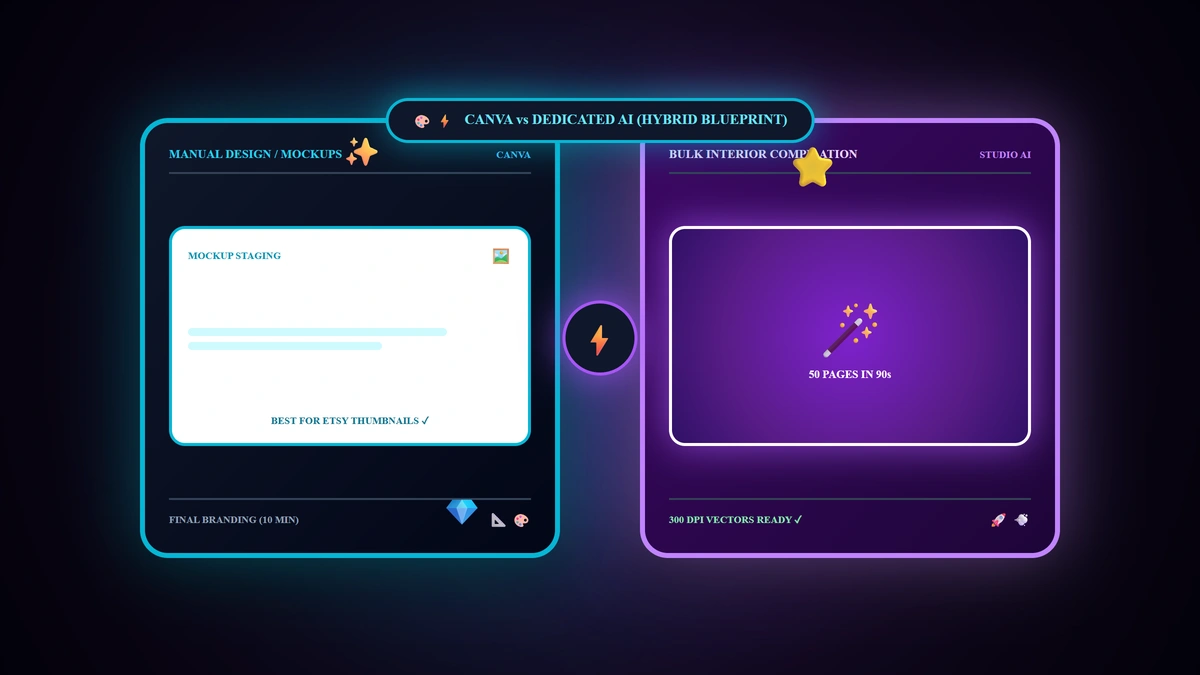
Canva is universally promoted across every digital e-commerce course as the default design platform, leading novice creators to believe it is the sole software required to operate an entire digital publishing empire. The definitive operational reality in 2026 is: Canva is peerless for single-page visual mockups, shop banners, and manual branding tweaks; however, utilizing it to manually construct a 50-page coloring book or undated daily planner page-by-page consumes 4 to 6 hours of exhausting drag-and-drop labor; dedicated generative AI engines compile 50 thematic interior pages in under 2 minutes; the winning strategy unites both tools in a 15-minute hybrid production workflow.
💡 Core Takeaways from this Toolchain Productivity Breakdown:
- Canva's Superpowers & Fatal Bottlenecks: Where manual design slows down storefront scaling.
- The Exponential Velocity of Studio AI: Formulating 50 cohesive vector spreads in 120 seconds.
- The Empirical Time & Labor Benchmark: Real creation hours across 4 flagship digital asset types.
- The 15-Minute Hybrid Master Workflow: Step-by-step pipeline from AI interior compilation to Canva mockups and live publishing.
1. Deconstructing Canva: Core Strengths vs. The 50-Page Bottleneck
Where Canva Dominates:
- Storefront Listing Mockups: Embedding digital interior screenshots into photorealistic iPad and desktop lifestyle mockups.
- Customer Download Hubs (Thank You PDFs): Styling branded customer fulfillment pages with clickable links.
- Discrete Single-Page Asset Customization: Fine-tuning typography on individual greeting cards or certificates.
The Inherent Canva Production Bottleneck:
When you decide to manufacture a 50-Page Illustrated Coloring Book or 100-Page Teacher Curriculum:
- Inside Canva, you must individually search for 50 distinct graphics, manually center tables across 50 separate artboards, and verify margin bleeds page-by-page, demanding 4 to 6 hours of repetitive manual toil per book!
2. The Technological Advantage of Dedicated Generative AI (Studio AI)
Deploying a dedicated digital product generative platform (such as Digital Products Maker):
- 1-Click Bulk Interior Compilation: Inputting a single niche seed prompt directs the engine to compile 50 thematic, high-contrast 300 DPI vector pages with cohesive artistic styling.
- Automated KDP & Print-Bleed Compliance: Eliminates manual alignment errors by generating ready-to-upload PDF architectures matching exact commercial trim specifications.
- Zero Creative Fatigue: Slashes interior production labor from 6 hours down to under 120 seconds!
3. Empirical Production Time Benchmark Matrix (2026)
| Digital Product Deliverable | Standard Manual Canva Workflow | Dedicated AI Generative Studio Workflow | Total Productivity Velocity Gain |
|---|---|---|---|
| 50-Page Vector Coloring Book | 4 to 6 Hours of repetitive labor | 90 Seconds automated compile | 98% Faster (Saves 5.5 Hours!) |
| 100-Page Undated Habit Planner | 5 Hours (Grid formatting & alignment) | 2 Minutes | Saves 4.8 Hours |
| 60-Card Educational Flashcard Deck | 3 Hours | 1 Minute | Saves 2.8 Hours |
| 5 Etsy Listing Mockup Frames | 10 Minutes (Canva is optimal) | Not tailored for mockup staging | Canva Wins Decisively |
4. The 15-Minute Hybrid Master Workflow Blueprint (2026)
Rather than choosing one tool over the other, top-performing digital sellers deploy this streamlined 3-step pipeline:
- Phase 1: Automated AI Interior Compilation (2 Minutes):
Compile 50 interior coloring spreads + cover art at 300 DPI via Digital Products Maker and export ready-to-print PDF. - Phase 2: High-Converting Canva Mockup Staging (10 Minutes):
Drop exported page previews into pre-saved Canva iPad/lifestyle mockup templates to attract buyer clicks. - Phase 3: Tagging & Publication (3 Minutes):
Embed 13 SEO tags, write conversion copy, and upload the master fulfillment PDF.
The Bottom Line: A commercial-grade digital product published to your storefront in 15 total minutes instead of losing an entire workday to manual formatting!
5. Toolchain Optimization Checklist
- Deploy Digital Products Maker for automated bulk interior workbook and planner generation.
- Reserve Canva exclusively for listing thumbnails, lifestyle mockups, and store banners.
- Save reusable Canva mockup presets to eliminate recurring staging setup time.
- Export final printable PDFs at 300 DPI to guarantee crisp customer physical printing.
6. Frequently Asked Questions (FAQ)
Does utilizing dedicated AI tools eliminate the need for Canva Pro?
Yes! You can operate completely on Canva's Free tier for mockups, relying on dedicated AI tools for premium, commercial-grade asset generation without purchasing paid Canva stock assets.
Can I import AI-generated pages into Canva for additional text overlays?
Yes! The extension exports standard crisp PNG and PDF files that can be dragged directly into Canva for optional customization.
Are AI-generated vectors crisp enough for commercial 300 DPI printing?
Yes! Dedicated generative engines produce high-contrast vector linework formatted at standard print resolutions (300 DPI), ensuring razor-sharp edges on home and commercial printers.
Summary and First Action Step
Time is your most valuable asset in digital commerce. Spending hours on repetitive alignment tasks limits your catalog scalability and revenue potential. Harness dedicated AI engines to compile bulk interior assets in seconds, deploy Canva to polish visual mockups, and scale your digital publishing business with effortless velocity in 2026.