How Much Money Do You Actually Need to Start a Digital Products Business in 2026? (Real Budget Breakdown)
The single biggest psychological barrier stopping 90% of aspiring online entrepreneurs is capital fear: "How many thousands of dollars will I need for initial inventory, expensive Adobe software licenses, custom web design, and paid ad testing?". The liberating reality in 2026 is that digital products commerce is the only business model in existence that you can launch completely for between $0 and $20 total; you never purchase upfront stock, never pay warehousing leases, and never need expensive freelance design agencies.
💡 Key Financial Insights from this Breakdown:
- The Line-Item Comparison Matrix: How automated modern tools save over $3,000 compared to the traditional agency approach.
- Itemized Budget Transparency: Exactly where every dollar goes (creation engines, listing fees, and payment processors).
- The 3 Starting Budget Tiers: The $0 Bootstrapper, the $20 Fast-Track, and the Scale-Up framework.
- Financial Safety Checklist: Guaranteeing you never spend an unnecessary dollar before validating organic buyer demand.
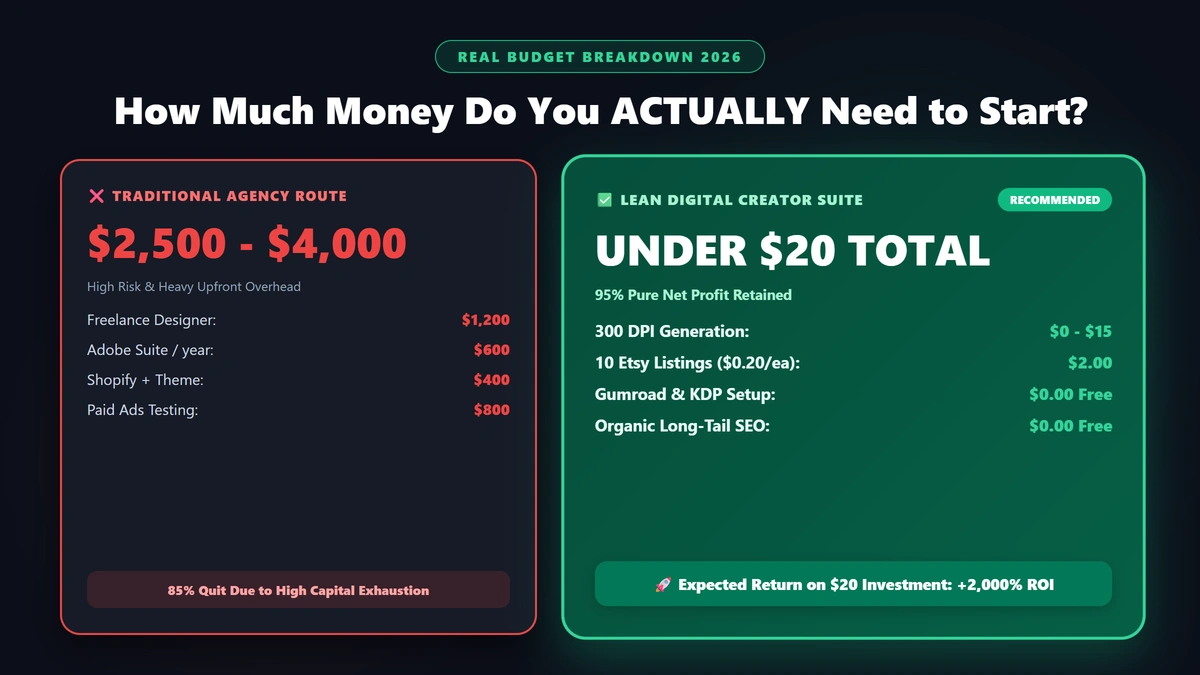
1. Line-Item Cost Comparison: Traditional Route vs. Lean Digital Suite
| Expense Category | Traditional Agency & Software Route | Lean Digital Creator Suite (Modern Route) |
|---|---|---|
| Graphic Design & Interior Formatting | $500 - $1,500 (Hiring freelance illustrators) | $0 - $15 (Automated 300 DPI generation) |
| Professional Software Subscriptions | $600 / Year (Adobe Creative Cloud $50/mo) | $0 (Cloud-native specialized creation suites) |
| E-Commerce Storefront & Hosting | $300 - $800 (Shopify store + theme + domain) | $0 (Free Etsy setup or Gumroad account) |
| Paid Ad Testing Budget | $500 - $1,000 (Meta & TikTok paid ad tests) | $0 (100% Organic long-tail keyword SEO) |
| Listing Fees for First 10 Products | Included in monthly store fees | $2.00 Total ($0.20 per 4-month Etsy listing) |
| Total Upfront Capital Required | $1,900 - $3,900 | $2.00 - $20.00 Total! |
2. Itemized Budget Breakdown: Where Does Your Money Actually Go?
1. Asset Creation & Interior Design ($0 to $15)
- In past years, producing a 60-page activity book or educational flashcard deck required commissioning freelance designers.
- Today, specialized creation platforms like Digital Products Maker allow anyone to generate print-ready coloring books, puzzles, flashcards, and planners in minutes with zero graphic design learning curve.
2. Marketplace Listing & Storefront Fees ($0 to $2)
- Etsy: Charges a nominal $0.20 listing fee per item for a full 4-month active window. (Listing 10 products costs just $2.00).
- Gumroad: Zero upfront listing fees, zero monthly hosting subscriptions.
- Amazon KDP: Free publishing for paperbacks and e-books; Amazon simply deducts printing costs after a physical copy is purchased.
3. Customer Acquisition & Marketing ($0)
- You do not need to burn money on paid ads.
- Built-in search engines on Etsy and Amazon KDP feature over 100 million active buyers searching with high buying intent. Optimizing your title and 13 tags connects your products with ready buyers organically.
4. International Payment Processing (Paid only when you sell)
- No upfront gateway fees. Payment processors (Stripe or PayPal) charge standard transaction fees (approx. 2.9% + $0.30) only after a customer successfully purchases your download.
3. The 3 Starting Budget Tiers
Tier 1: The $0 Bootstrapper
- Platforms: Free Gumroad store link-in-bio and Amazon KDP paperback catalog.
- Marketing: Free Pinterest idea pins and 15-second TikTok demonstration videos.
- Total Out-of-Pocket Cost: $0.00 Flat.
Tier 2: The $20 Fast-Track (Recommended)
- Platforms: Dedicated Etsy shop populated with 15 to 25 niche listings ($3 - $5 in listing fees).
- Production: Utilizing automated creation tools to generate high-resolution 300 DPI master PDFs.
- Total Out-of-Pocket Cost: Under $20.00.
4. Financial Safety Action Checklist
- Never spend money on paid ads until you have verified organic sales momentum.
- Utilize zero-risk marketplaces (Etsy / Gumroad / KDP) with zero recurring monthly subscription overhead.
- Price deliverables strategically ($7 to $29) to ensure retained profit margins exceed 90% after transaction fees.
- Reinvest your first $100 in profits into expanding your digital catalog with complementary product bundles.
5. Frequently Asked Questions (FAQ)
Are there any hidden monthly subscription charges?
No. Marketplaces like Etsy, Gumroad, and Amazon KDP operate on transparent pay-as-you-go or transaction fee models with zero hidden account maintenance fees.
Do I need a high-end computer to build digital products?
No. Any standard laptop or desktop capable of running a modern web browser is more than sufficient to format, download, and manage your store.
What is the typical return on my initial $20 investment?
Publishing 10 to 15 optimized listings that average just 3 sales each per month at $10 yields $300 to $450 in monthly passive revenue at a 95% margin—representing an ROI exceeding 2,000% on your initial micro-budget.
Summary and First Action Step
Capital constraints are no longer an obstacle in the modern digital creator economy. For less than the cost of a single dinner out, you can establish an automated digital asset catalog today. Invest $10 to $20 in your initial listings and start building your financial leverage right now.