The High-Ticket Wedding Stationery Blueprint: How to Sell $47+ Canva Bundles on Etsy (2026)
Why is the digital wedding stationery sector consistently the highest-converting and most profitable niche on Etsy and Canva? Because engaged couples possess the highest immediate purchasing urgency and the lowest price resistance across the entire digital commerce landscape. While inexperienced creators sell standalone single invitations for $6, top stationery studios capture the market by delivering cohesive 8-piece suites priced between $47 and $89 per bundle.
💡 Key Takeaways from this Blueprint:
- Wedding Buyer Psychology: Why brides overwhelmingly purchase complete suites rather than sourcing piecemeal stationery assets.
- The 8-Piece Suite Anatomy: Exact standard print dimensions for pre-wedding, day-of, and post-wedding collateral.
- Canva Typography Discipline: Pairing 100% free commercial script and serif fonts to eliminate unexpected client upgrade paywalls.
- The Zero-Refund Fulfillment Protocol: Delivering multiple print export setups (Single PDF vs. Multi-up Print Sheets with Crop Marks).
1. Single Invitation vs. 8-Piece Suite: The Unit Economics
When a bride selects an invitation theme, she immediately requires matching RSVP cards, menus, detail inserts, and seating charts in identical colorways, fonts, and botanical motifs. Packaging these assets together solves a massive logistical problem and multiplies average order value by 8x.
| Structural Metric | Single Invitation Listing ($6 - $9) | All-in-One Wedding Suite ($47 - $89) |
|---|---|---|
| Asset Count | 1 standalone card (5x7 in) | 8 synchronized assets across all event milestones |
| Conversion Rate (CR) | Moderate | High (eliminates design friction and font hunting) |
| Average Order Value (AOV) | $6.50 | $54.00 |
| 5-Star Review Velocity | Standard | Rapid (praised for elegance, completeness, and ease) |
| Customer Support Load | Variable | Near-zero (comprehensive printing guide included) |
2. The 8-Piece Digital Wedding Suite Anatomy
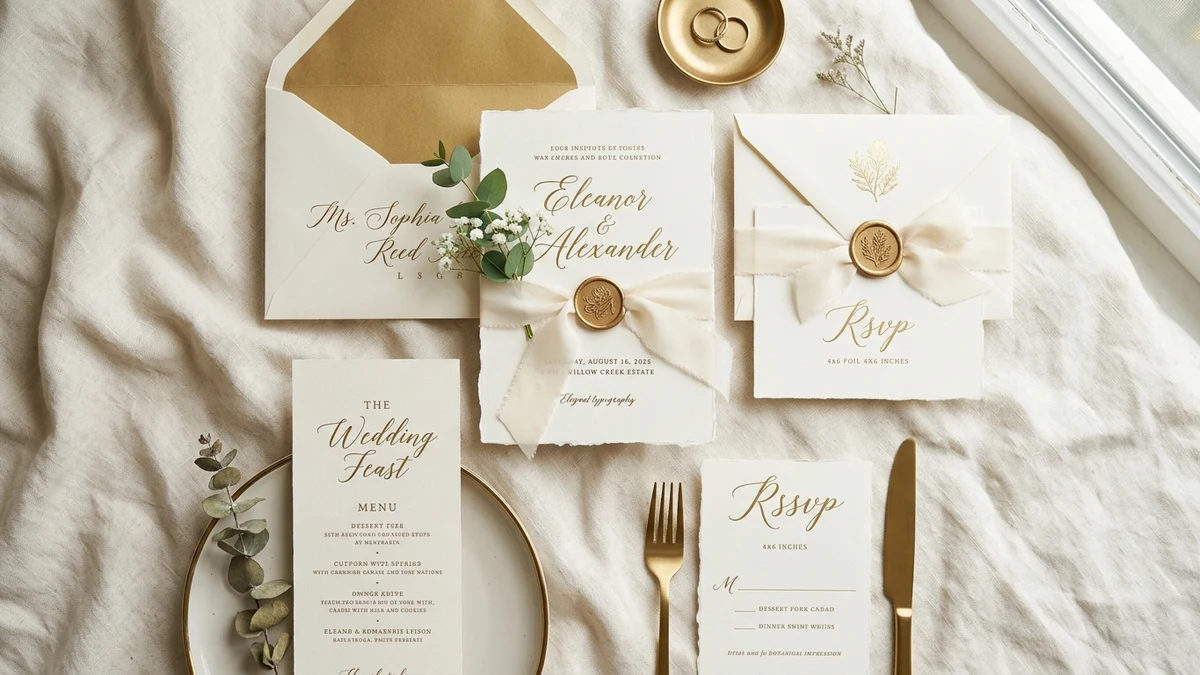
To justify premium pricing ($47+), your bundle must comprehensively address the three primary event phases:
Phase 1: Pre-Wedding Collateral
- Save the Date Card: Standard 5x7 inch layout with photo placeholder or elegant typography.
- Main Wedding Invitation: 5x7 inch master card with structured hierarchy for couples, date, venue, and reception.
- RSVP Response Card with QR Code: 3.5x5 inch card configured for traditional mail-in checkmarks or scannable online wedding registries.
- Details & Accommodations Card: 3.5x5 inch insert covering hotel room blocks, travel directions, and dress codes.
Phase 2: Day-of Event Stationery
- Dinner Menu Card: Elegant 4x9 inch vertical layout for place settings.
- Master Seating Chart Poster: Large-format files formatted in both 18x24 inch and 24x36 inch dimensions.
- Table Numbers & Place Cards: 5x7 inch table markers and 3.5x2 inch folded tent cards.
Phase 3: Post-Wedding Keepsakes
- Thank You Card: 3.5x5 inch folded card featuring matching floral flourishes and custom sign-offs.
3. Canva Technical Rules for Flawless Printing
- Strict 100% Free Asset Architecture:
- Curate pairings from open Canva library fonts: Playfair Display, Cormorant Garamond, Pinyon Script, Great Vibes, Montserrat.
- Strictly omit any Canva Pro crown icons from graphics or font choices so buyers on free accounts can edit and export without surprise fees.
- Bleed and Crop Marks Enablement:
- Include visual instructions demonstrating how to select PDF Print -> Crop marks and bleed when printing through services like Prints of Love or local print houses.
- Multi-Up Printing Templates (Paper Saving):
- Provide pre-arranged 8.5x11 inch US Letter sheets (e.g. two 5x7 invites per page, four 3.5x5 cards per page) for DIY budget-conscious couples.
4. Pre-Launch Quality Assurance Checklist
- Hex color code harmonization audited across all 8 template files.
- All typography boxes verified as fully editable dynamic text fields.
- Template links tested in incognito mode using a free, unauthenticated Canva account.
- 3-page illustrated Printing & Editing Guide PDF bundled inside the instant download deliverable.
- High-definition lifestyle mockups rendered with silk ribbons, wax seals, and soft natural lighting.
5. Frequently Asked Questions (FAQ)
Do wedding buyers print templates at home or through commercial print shops?
Approximately 70% of wedding stationery buyers send their customized PDFs to dedicated online print partners (such as Prints of Love, Zola, or local print shops), while 30% print smaller collateral at home. Providing both standard 300 DPI single files and multi-up sheets satisfies both segments.
What are the highest-selling wedding design aesthetics in 2026?
Top-performing visual themes include: Minimalist Modern Editorial Typography (Black & White), Organic Eucalyptus & Sage Greenery, and Earthy Terracotta & Tuscan Floral Warmth.
Can I offer custom font upload options in Canva templates?
Free Canva accounts cannot upload custom TTF/OTF font files. Always design your baseline templates using Canva's rich native free font catalog to ensure universal compatibility.
Summary and Action Steps
Digital wedding stationery delivers unparalleled profit margins and order values in the printable commerce sector. Select an evergreen wedding aesthetic, engineer the 8 synchronized templates with strict free-tier assets, and launch your automated high-ticket stationery store today.