How to Connect OpenAI API (GPT-4o & DALL-E 3) in Digital Products Maker for High-Res Ebooks & Covers
OpenAI's flagship models (GPT-4o and DALL-E 3) represent the gold standard in linguistic precision and high-impact visual cover creation for Amazon KDP and Etsy digital downloads. The direct, step-by-step reality in 2026 is: You can connect OpenAI API to Digital Products Maker in under 2 minutes by depositing prepaid credits ($5 minimum) on the OpenAI Developer Platform, provisioning a secret API key (sk-...), and pairing GPT-4o Mini with DALL-E 3 and Pollinations fallback to manufacture elite 300 DPI deliverables for pennies per unit.
💡 Core Takeaways from this OpenAI Setup Blueprint:
- Direct Portal Links & Prepaid Funding: Navigating OpenAI Platform billing to activate pay-as-you-go credits without recurring subscriptions.
- Secret API Key Provisioning: Generating secure credentials (
sk-...) and configuring soft monthly budget caps.- Extension Setting Tuning: Activating Paid/Premium Model tiers, configuring GPT-4o / GPT-4o Mini, and selecting DALL-E 3.
- Fail-Safe Fallback Architecture: Enabling Pollinations.ai integration to maintain uninterrupted generation velocity.
1. Step 1: Funding Prepaid Credits on OpenAI Platform
OpenAI API functions on a pure pay-as-you-go prepaid ledger. Execute this official workflow:
- Register or log in to the official developer hub:
🔗 OpenAI Developer Platform - Navigate directly to the billing overview dashboard:
🔗 OpenAI Billing Settings - Click "Add to credit balance" and deposit an initial nominal amount ($5.00 or $10.00 is sufficient to generate dozens of complete commercial books).
- Once funded, navigate directly to your API credentials page:
🔗 OpenAI API Keys Dashboard - Click "Create new secret key", assign an identifier (e.g. DPMaker Studio), and copy the secret key string prefixed with
sk-....
2. Step 2: Configuring OpenAI in Digital Products Maker
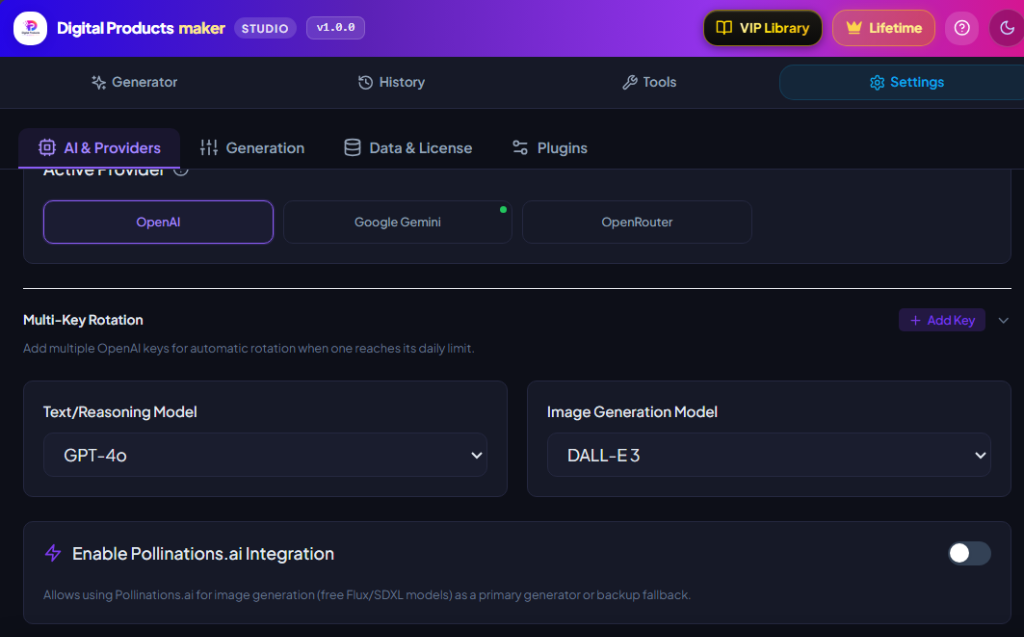
Launch the Digital Products Maker extension interface and follow the sequence shown above:
- Click on Settings (⚙️) -> select the AI & Providers tab.
- Under API Source & Tier:
- Select Personal Keys.
- Select Paid / Premium Models.
- Under Active Provider:
- Click on the OpenAI card.
- Under Text/Reasoning Model:
- Select GPT-4o Mini (Default) for lightning-fast speeds and ultra-economic rates ($0.00015 per 1k tokens).
- Or select GPT-4o for advanced creative manuscripts requiring deep reasoning.
- Under Image Generation Model:
- Select DALL-E 3 for high-contrast commercial covers.
- Under Multi-Key Rotation:
- Click + Add Key, paste your
sk-...secret key, and click Save Keys to illuminate the Green Connected Status Dot.
- Click + Add Key, paste your
3. Autonomous Resilience: Enabling Pollinations.ai Backup Fallback
To ensure your production workflows never stall if OpenAI credits are temporarily depleted, configure the Pollinations.ai Integration toggle:
- Activation: Toggle the purple switch located below the provider settings card.
- Mode Selection: Select Backup Fallback (Automatic). The extension prioritizes DALL-E 3, but if rate limits or billing thresholds occur, it autonomously routes the prompt through free Flux/SDXL models without failing your batch export job.
4. OpenAI Cost & Production Economics Table (2026)
| Model Name in Extension | Output Nature | Unit Pricing Metric | Production Capacity with $5 Prepaid Balance |
|---|---|---|---|
| GPT-4o Mini (Default) | Reasoning & Text | $0.00015 per 1k tokens | 300+ Complete Interior Master Books |
| GPT-4o (Flagship) | Advanced Synthesis | $0.005 per 1k tokens | 40 to 50 High-Complexity Manuals |
| DALL-E 3 | High-Res 300 DPI Art | $0.040 per master image | 125 Commercial Full-Color Covers |
| DALL-E 2 | Fast Concept Art | $0.020 per image | 250 Rapid Concept Mockups |
5. Connection Pre-Flight Verification Checklist
- Fund $5.00+ prepaid balance via OpenAI Billing.
- Provision a private secret key via OpenAI API Keys.
- Select Paid / Premium Models within Digital Products Maker settings.
- Paste your secret key and confirm the Green Active Indicator illuminates on the OpenAI card.
- Enable Pollinations.ai Integration in Backup Fallback mode for 100% operational uptime.
6. Frequently Asked Questions (FAQ)
How is the OpenAI API different from a ChatGPT Plus ($20/mo) subscription?
ChatGPT Plus is a consumer web subscription, whereas OpenAI API is a raw developer infrastructure billed purely on actual token usage. Depositing $5.00 into your API account is often enough to manufacture hundreds of digital deliverables without monthly recurring fees.
How do I prevent unexpected credit card charges?
You can set hard and soft monthly spending limits in your OpenAI billing dashboard (e.g. $10/month cap); OpenAI will automatically cease requests once that budget is reached.
Are DALL-E 3 generated images cleared for commercial sale on Etsy and Amazon?
Yes! OpenAI explicitly grants full 100% commercial ownership rights for all text and image assets generated through its official API.
Summary and First Action Step
Integrating OpenAI API into Digital Products Maker elevates your digital deliverables to the highest echelon of commercial polish. Fund your developer account with a modest balance today, connect your secret key, and unlock the full potential of GPT-4o and DALL-E 3 to scale your digital product business in 2026.