Two-Factor Authentication (2FA) & One-Click SSO Extension Activation Engine
As creators, publishers, and e-commerce entrepreneurs scale their businesses with Digital Products Maker (dp-maker), account security and seamless software onboarding become paramount. A compromised portal account can lead to hijacked commercial licenses, stolen asset libraries, or disrupted publishing workflows. Concurrently, manual license key copy-pasting into desktop browser extensions introduces customer friction and configuration errors.
To address these dual challenges with uncompromising engineering rigor, Digital Products Maker implements an RFC 6238 Time-Based One-Time Password (TOTP) 2FA engine alongside a frictionless 60-second Single Sign-On (SSO) token activation protocol and license-gated software update distribution.
1. Architectural Blueprint & Security Subsystems
The 2FA and SSO subsystems integrate three key components across the authentication lifecycle:
- TOTP RFC 6238 Engine: Generates 160-bit Base32 secret keys, renders standard
otpauth://QR codes, and verifies 6-digit rolling codes within a strict clock drift window. - One-Click Token SSO Bridge: Ephemeral 60-second cryptographic tokens (
extension_auth_tokens) exchanged via securewindow.postMessageto bind browser extensions without exposing raw license keys. - Protected Binary Update Stream: Out-of-tree binary storage (
protected_uploads) streamed through a verified license entitlement controller.
+---------------------------------------------------------------------------------------------------+
|                                 Customer Portal Dashboard (/portal)                               |
+--------------------------------+----------------------------------+-------------------------------+
                                 |                                  |
               [1. Setup 2FA]    |                [2. One-Click SSO]|
                                 v                                  v
+--------------------------------+------+       +-------------------+-------------------------------+
|      RFC 6238 TOTP Engine             |       |    SSO Token Generation Controller                |
|  - speakeasy.generateSecret()         |       |  - crypto.randomUUID()                            |
|  - Base32 Key in customer_totp_secrets|       |  - 60-second TTL in extension_auth_tokens         |
|  - qrcode.toDataURL() Base64 stream   |       |  - Dispatched via window.postMessage              |
+--------------------------------+------+       +-------------------+-------------------------------+
                                 |                                  |
                                 | [6-digit TOTP]                   | [One-Time Token + device_uuid]
                                 v                                  v
+--------------------------------+------+       +-------------------+-------------------------------+
|    Login Challenge Interceptor        |       |    License Token Activation Controller            |
|  - Intercepts unverified logins       |       |  - POST /api/license/activate-by-token            |
|  - Validates rolling TOTP token       |       |  - Checks customer license & device quota         |
|  - Issues signed 7-day Portal JWT     |       |  - Issues unique 32-byte device_secret            |
+---------------------------------------+       +---------------------------------------------------+
2. RFC 6238 TOTP Two-Factor Authentication Lifecycle
The two-factor authentication subsystem complies fully with RFC 6238 (Time-Based One-Time Password Algorithm) and RFC 4226 (HMAC-Based One-Time Password Algorithm), ensuring plug-and-play compatibility with Google Authenticator, Microsoft Authenticator, Apple Passwords, Authy, and 1Password.
2.1 Schema Definition (customer_totp_secrets)
TOTP secrets are isolated in a dedicated relational schema linked by a strict foreign key to the primary customer record:
CREATE TABLE customer_totp_secrets (
  id INT AUTO_INCREMENT PRIMARY KEY,
  customer_account_id INT NOT NULL UNIQUE,
  secret VARCHAR(255) NOT NULL,
  is_enabled BOOLEAN DEFAULT FALSE,
  created_at TIMESTAMP DEFAULT CURRENT_TIMESTAMP,
  FOREIGN KEY (customer_account_id) REFERENCES customer_accounts(id) ON DELETE CASCADE
);
2.2 Secret Generation & QR Code Provisioning (POST /api/portal/2fa/generate)
When a customer clicks "Enable 2FA" in their security preferences, the server dynamically provisions a cryptographic secret and renders an inline Data URI QR code:
// server/src/features/customer-portal/controller.ts
import speakeasy from "speakeasy";
import qrcode from "qrcode";

export async function generate2FA(req: PortalRequest, res: Response) {
  try {
    const customerId = req.customer?.id;
    if (!customerId) return res.status(401).json({ error: "Unauthorized" });

    // Fetch customer email for branded otpauth URI label
    const [custRows]: any = await pool.query(
      "SELECT email FROM customer_accounts WHERE id = ?",
      [customerId]
    );
    if (custRows.length === 0) return res.status(404).json({ error: "Customer not found" });
    const email = custRows[0].email;

    // Generate Base32 secret with branded issuer
    const secret = speakeasy.generateSecret({
      name: `AI Digital Products (${email})`
    });

    // Store or update secret with unconfirmed status (is_enabled = 0)
    const [existingRows]: any = await pool.query(
      "SELECT id FROM customer_totp_secrets WHERE customer_account_id = ?",
      [customerId]
    );

    if (existingRows.length > 0) {
      await pool.query(
        "UPDATE customer_totp_secrets SET secret = ?, is_enabled = 0 WHERE customer_account_id = ?",
        [secret.base32, customerId]
      );
    } else {
      await pool.query(
        "INSERT INTO customer_totp_secrets (customer_account_id, secret, is_enabled) VALUES (?, ?, 0)",
        [customerId, secret.base32]
      );
    }

    // Render Data URL image string for direct visual display
    const qrDataURL = await qrcode.toDataURL(secret.otpauth_url || "");
    res.json({ secret: secret.base32, qrCode: qrDataURL });
  } catch (err: any) {
    res.status(500).json({ error: "Failed to generate 2FA." });
  }
}
2.3 Verification & Confirmation Handshake (POST /api/portal/2fa/verify)
To prevent lockouts from misconfigured authenticator apps, 2FA is never activated immediately upon secret generation. The customer must prove possession by submitting their first valid 6-digit code:
export async function verify2FA(req: PortalRequest, res: Response) {
  try {
    const customerId = req.customer?.id;
    if (!customerId) return res.status(401).json({ error: "Unauthorized" });

    const { token } = req.body;
    if (!token) return res.status(400).json({ error: "Token required" });

    const [rows]: any = await pool.query(
      "SELECT secret FROM customer_totp_secrets WHERE customer_account_id = ?",
      [customerId]
    );
    if (rows.length === 0) return res.status(400).json({ error: "2FA not initialized" });

    // Verify 6-digit code using 30-second time window
    const verified = speakeasy.totp.verify({
      secret: rows[0].secret,
      encoding: "base32",
      token
    });

    if (verified) {
      // Mark 2FA as fully armed and enabled
      await pool.query(
        "UPDATE customer_totp_secrets SET is_enabled = 1 WHERE customer_account_id = ?",
        [customerId]
      );
      res.json({ message: "2FA enabled successfully" });
    } else {
      res.status(400).json({ error: "Invalid 2FA token" });
    }
  } catch (err: any) {
    res.status(500).json({ error: "Failed to verify 2FA." });
  }
}
2.4 Login Interception Challenge
When a customer logs in via POST /api/portal/login, the controller checks customer_totp_secrets.is_enabled. If enabled, standard JWT issuance is halted, and the server returns:
{
  "requires2FA": true,
  "message": "Two-factor authentication code required."
}
The user is redirected to a secure 2FA challenge screen to input their 6-digit dynamic authenticator code before obtaining their 7-day session token.
3. One-Click Extension Activation (SSO Token Protocol)
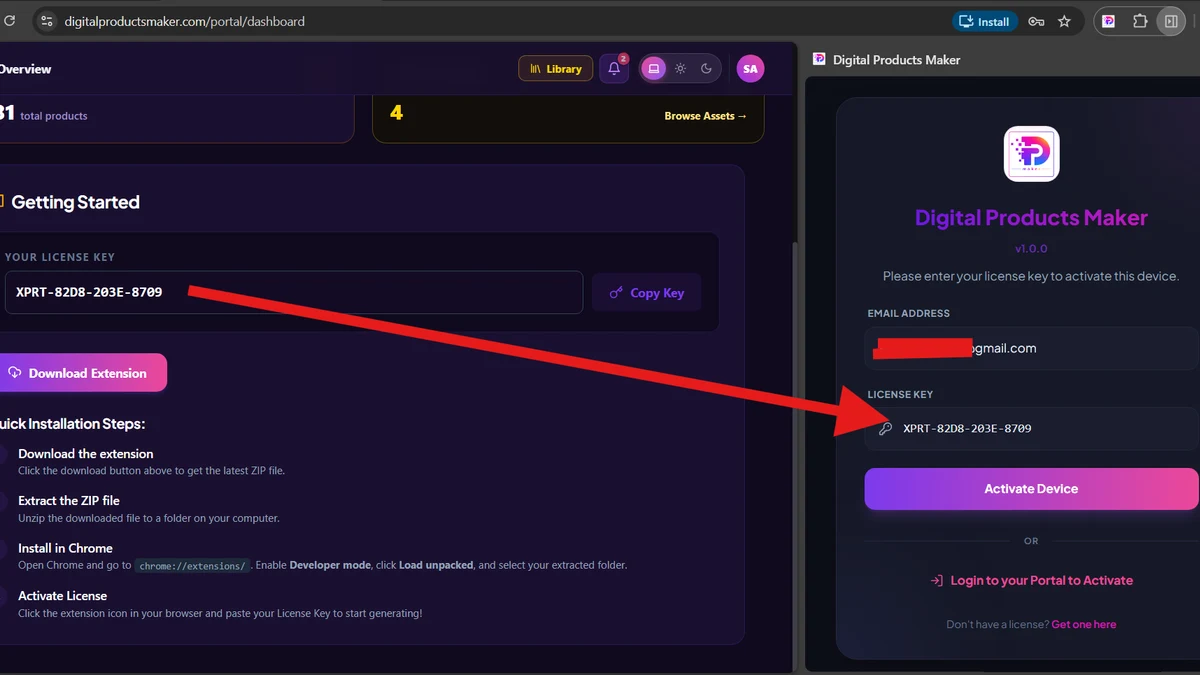
Manually copying a 32-character license key from an email or web dashboard into the Chrome Extension introduces friction, copy-paste truncation errors, and support overhead.
Digital Products Maker replaces this with an automated One-Click Single Sign-On (SSO) Activation Handshake.
+------------------+         +--------------------+         +-------------------+
| Chrome Extension |         |  Customer Portal   |         |   Backend Server  |
+--------+---------+         +---------+----------+         +---------+---------+
         |                             |                              |
         | 1. Opens /portal?auth=1     |                              |
         |---------------------------->|                              |
         |                             | 2. POST /extension-token     |
         |                             |----------------------------->|
         |                             |                              | 3. Creates UUID
         |                             |                              |    (60-sec TTL)
         |                             | 4. Returns { token: UUID }   |
         |                             |<-----------------------------|
         | 5. window.postMessage(token)|                              |
         |<----------------------------|                              |
         |                                                            |
         | 6. POST /api/license/activate-by-token { token, device_uuid }
         |----------------------------------------------------------->|
         |                                                            | 7. Validates token
         |                                                            | 8. Binds hardware
         |                                                            | 9. Generates secret
         | 10. Returns { message, device_secret, plan_id, license_key }|
         |<-----------------------------------------------------------|
3.1 Token Issuance (POST /api/portal/extension-token)
When requested by an authenticated portal session, the server generates a cryptographically secure v4 UUID with a strict 60-second Time-To-Live (TTL):
export async function generateExtensionToken(req: PortalRequest, res: Response) {
  try {
    const token = crypto.randomUUID();
    const customerId = req.customer!.id;
    const expiresAt = new Date(Date.now() + 60000); // 60-second window

    await pool.query(
      "INSERT INTO extension_auth_tokens (token, customer_id, expires_at) VALUES (?, ?, ?)",
      [token, customerId, expiresAt]
    );

    res.json({ token });
  } catch (error) {
    res.status(500).json({ error: 'Server error generating token' });
  }
}
3.2 Single-Use Activation & Device Binding (POST /api/license/activate-by-token)
The Chrome Extension captures the token and immediately calls the activation endpoint alongside its unique device_uuid:
// server/src/features/license/controller.ts
export async function activateByToken(req: Request, res: Response) {
  try {
    const { extension_token, device_uuid } = req.body;

    if (!extension_token || !device_uuid) {
      return res.status(400).json({ error: 'Missing extension_token or device_uuid' });
    }

    // 1. Verify token existence, single-use status, and expiry
    const [tokenRows]: any = await pool.query(
      'SELECT customer_id, expires_at, used FROM extension_auth_tokens WHERE token = ?',
      [extension_token]
    );

    if (tokenRows.length === 0) {
      return res.status(403).json({ error: 'Invalid or expired activation token' });
    }

    const tokenData = tokenRows[0];
    if (tokenData.used) {
      return res.status(403).json({ error: 'Activation token already used' });
    }
    if (new Date(tokenData.expires_at) < new Date()) {
      return res.status(403).json({ error: 'Activation token expired' });
    }

    // 2. Locate active, unbanned license owned by this customer
    const [licRows]: any = await pool.query(
      'SELECT * FROM licenses WHERE customer_account_id = ? AND is_active = 1 AND is_banned = 0',
      [tokenData.customer_id]
    );

    if (licRows.length === 0) {
      return res.status(404).json({ error: 'No active license found linked to your account' });
    }

    const license = licRows[0];
    const license_key = license.license_key;

    // 3. Check hardware slot limit in license_devices
    const [existingDevice]: any = await pool.query(
      'SELECT device_secret FROM license_devices WHERE license_key = ? AND device_uuid = ?',
      [license_key, device_uuid]
    );

    let deviceSecret;
    if (existingDevice.length > 0) {
      deviceSecret = existingDevice[0].device_secret;
    } else {
      const [boundCount]: any = await pool.query(
        'SELECT COUNT(*) as count FROM license_devices WHERE license_key = ?',
        [license_key]
      );

      if (boundCount[0].count >= (license.max_devices || 1)) {
        return res.status(403).json({
          error: 'Maximum device limit reached for this license.',
          needs_unbind: true,
          license_key
        });
      }

      deviceSecret = generateDeviceSecret();
      await pool.query(
        'INSERT INTO license_devices (license_key, device_uuid, device_secret) VALUES (?, ?, ?)',
        [license_key, device_uuid, deviceSecret]
      );
    }

    // 4. Invalidate token immediately upon successful binding
    await pool.query('UPDATE extension_auth_tokens SET used = 1 WHERE token = ?', [extension_token]);

    return res.status(200).json({
      message: 'Activation successful',
      device_secret: deviceSecret,
      license_key: license_key,
      user_email: license.user_email,
      plan_id: license.plan_id
    });
  } catch (error) {
    res.status(500).json({ error: 'Internal server error during activation' });
  }
}
4. Protected Software Updates Delivery Pipeline
To prevent reverse-engineering and distribution of cracked builds, binary update archives (.zip) are stored in private server storage (protected_uploads) outside the public web root.
4.1 License-Entitlement Streaming (GET /api/portal/downloads/:id/file)
Before streaming any update package, the server executes a live entitlement query to ensure the requesting customer owns an active, unbanned, and unexpired license:
SELECT l.license_key
FROM licenses l
LEFT JOIN plans p ON l.plan_id = p.id
WHERE l.customer_account_id = ?
  AND l.is_active = TRUE AND l.is_banned = FALSE
  AND (p.is_lifetime = 1 OR l.expires_at IS NULL OR l.expires_at >= NOW());
- If the license is expired, the server terminates with HTTP 403 Forbidden:
"Your license has expired or is inactive. Please renew your plan to download extension files." - If verified, the server creates a readable stream (
fs.createReadStream), logs the download toupdate_download_logs, incrementsapp_updates.download_count, and sends headers:Content-Type: application/zipandContent-Disposition: attachment; filename="DPMaker_vX.X.X.zip".
5. Security Troubleshooting & Error Code Guide
| Error Scenario | Triggering Condition | HTTP Code & Response Payload | Resolution |
|---|---|---|---|
| 2FA Verification Failure | User enters out-of-sync or incorrect 6-digit TOTP code. | 400 Bad Request{"error": "Invalid 2FA token"} |
Verify device time synchronization or re-enter current rolling code before 30-second rollover. |
| SSO Token Expired | Extension submits token after the 60-second TTL has elapsed. | 403 Forbidden{"error": "Invalid or expired activation token"} |
Click "Activate Extension" in Customer Portal again to issue a fresh 60s token. |
| SSO Token Replay | Same token submitted more than once (used = 1). |
403 Forbidden{"error": "Activation token already used"} |
Tokens are single-use. Initiate a new activation from the portal. |
| Update Download Denied | Customer account has no active or unexpired license key. | 403 Forbidden{"error": "Your license has expired or is inactive..."} |
Renew or upgrade subscription via Customer Portal > Billing tab. |
| Device Slot Full on SSO | Extension activated on machine when boundCount >= max_devices. |
403 Forbidden{"error": "Maximum device limit reached...", "needs_unbind": true} |
Unbind an unused machine slot in Customer Portal > My Licenses. |
6. Bilingual Terminology Reference (EN & AR)
| English Term | المصطلح العربي المعتمد | Technical Implementation Context |
|---|---|---|
| Two-Factor Authentication (2FA) | المصادقة الثنائية (2FA) | RFC 6238 TOTP security layer managed via customer_totp_secrets. |
| Authenticator Code / TOTP | رمز تطبيق المصادقة | 6-digit dynamic rolling passcode generated every 30 seconds. |
| One-Click Extension Activation | التفعيل الفوري للإضافة بضغطة زر | Single Sign-On (SSO) workflow using 60-second UUID tokens. |
| Single Sign-On (SSO) Token | رمز المصادقة الموحدة المؤقت | Ephemeral token stored in extension_auth_tokens table. |
| Protected Uploads Stream | البث الآمن للملفات المحمية | Secure binary streaming of software updates from private storage. |
| Hardware Fingerprint Binding | ربط البصمة التعريفية للجهاز | Association of device_uuid and device_secret in license_devices. |
| License Entitlement Verification | التحقق من أهلية وصلاحية الترخيص | Real-time database check confirming active, unbanned, unexpired status. |
Conclusion & Architectural Summary
The combination of RFC 6238 TOTP Two-Factor Authentication, 60-Second One-Click SSO Extension Activation, and License-Verified Binary Streaming establishes an enterprise-grade security posture for Digital Products Maker. Creators enjoy seamless, error-free extension onboarding while their commercial licenses and valuable digital assets remain guarded by state-of-the-art cryptographic controls.