How to Enable Pollinations.ai Integration in Digital Products Maker: Free Flux/SDXL Images & Auto Fallback
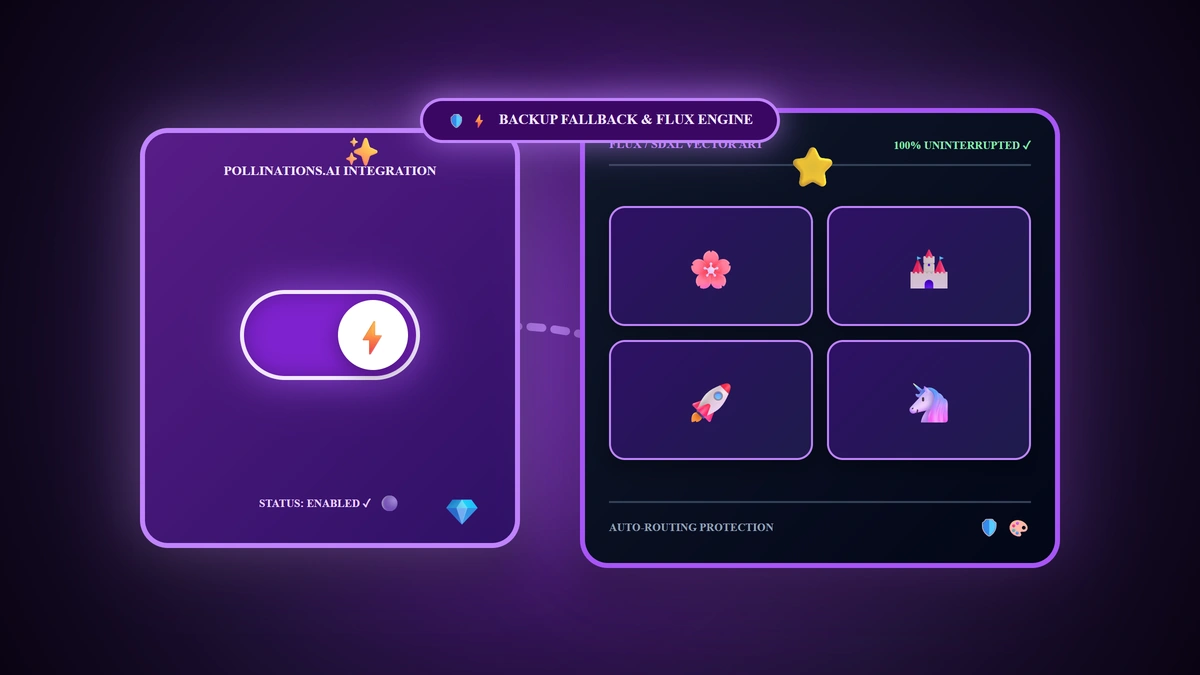
When orchestrating a high-volume batch generation of a 50-page coloring book or printable worksheet collection, nothing disrupts productivity more than encountering an unexpected API rate limit or depleted prepaid ledger balance halfway through your export job. The engineering solution integrated into Digital Products Maker in 2026 is: We natively integrated the open-source Pollinations.ai infrastructure running Flux 1 and Stable Diffusion XL (SDXL); you can deploy it either as your Primary Generator for 100% free visual asset generation, or as an autonomous Backup Fallback that seamlessly routes prompts when your primary provider is temporarily unavailable.
💡 Core Takeaways from this Visual Resilience Blueprint:
- The Pollinations.ai Open Architecture: Leveraging free cloud-hosted Flux and SDXL pipelines with zero mandatory credit cards.
- Dual Integration Modes (Primary vs. Fallback): Selecting the optimal operational configuration for your business model.
- 30-Second Activation Sequence: Enabling the purple control switch and configuring optional priority API credentials.
- Bulk Export Resilience Checklist: Verifying uninterrupted 300 DPI master deliverables during large generation batches.
1. What is Pollinations.ai and How Does It Operate?
Pollinations.ai is a globally distributed open-source generative platform offering high-throughput image inference powered by Flux 1 and Stable Diffusion XL (SDXL):
- Official Portal Gateway:
🔗 Pollinations.ai Official Portal - Public Free Tier: Operates with zero signup requirements, zero subscriptions, and instant global availability.
- Optional Private API Key: Available for high-volume enterprises seeking dedicated priority compute pipelines during peak global traffic windows.
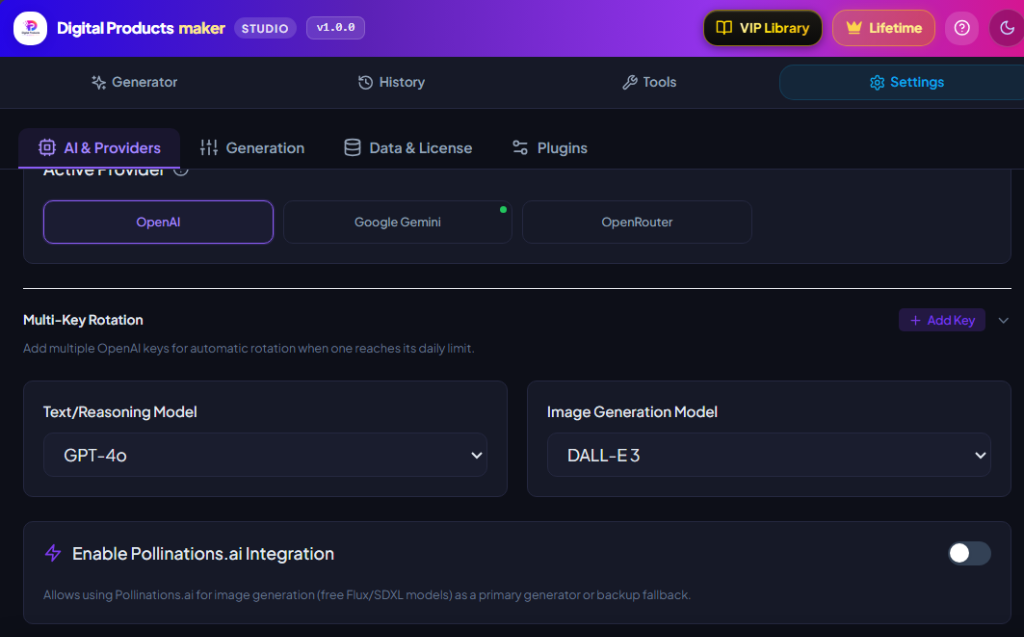
2. Step-by-Step Configuration in Digital Products Maker
Launch the Digital Products Maker extension interface and follow the sequence shown above:
- Click on Settings (⚙️) -> select the AI & Providers tab.
- Scroll to the dedicated card at the bottom:
Enable Pollinations.ai Integration. - Toggle the control switch to ON (illuminating in bright purple).
- Configure your preferred operational mode:
Mode A: Backup Fallback (Automatic) — Recommended Standard
- If you utilize DALL-E 3 or Google Image models, keep this mode active. Digital Products Maker will prioritize your flagship provider first; if rate limits, quota exhaustion, or temporary network drops occur, the engine autonomously routes remaining pages through Pollinations without halting your active export job.
Mode B: Primary Generator — Recommended for $0 Budgets
- If you operate with zero software budget and wish to generate coloring interiors, cards, and activity sheets for $0 without connecting paid OpenAI accounts, select this mode as your default graphics engine.
- Optional API Key Field:
Leave blank to utilize the public high-speed tier, or paste your dedicated token if provisioned.
3. Why Automated Fallback Architecture Protects Revenue
- Zero-Failure Batch Exports: When generating 50 complex coloring spreads, you never need to monitor progress nervously; the system handles transient provider outages autonomously behind the scenes.
- Strategic Cost Optimization: Creators can deploy Pollinations for interior black-and-white vector spreads, reserving premium DALL-E 3 balance strictly for high-impact full-color covers.
4. Visual Generation Architecture Comparison Matrix (2026)
| Visual Generation Strategy | Active Silicon Pipeline | Financial Cost per Image | Operational Resilience Score |
|---|---|---|---|
| Isolated DALL-E 3 (Without Fallback) | DALL-E 3 exclusively | $0.040 per master image | High risk of job failure on billing exhaustion |
| DALL-E 3 + Pollinations Backup (Optimal) | DALL-E 3 + Flux/SDXL Auto-Failover | Prepaid primary + $0 fail-safe | 100% Unbreakable Continuous Uptime |
| Pollinations as Primary Generator | Flux 1 & SDXL Open Engines | 100% Free ($0.00) | Elite for zero-capital bootstrapping |
5. Visual Resilience Pre-Flight Action Checklist
- Toggle Enable Pollinations.ai Integration to ON in extension settings.
- Select Backup Fallback if deploying paid models, or Primary Generator for zero-cost operation.
- Execute a single-page test generation to verify crisp 300 DPI vector line weights.
- Launch a multi-page batch export to experience uninterrupted generation velocity.
6. Frequently Asked Questions (FAQ)
Are images generated via Pollinations cleared for commercial sale on Etsy and Amazon?
Yes! Pollinations utilizes Flux and Stable Diffusion open-weight models that explicitly permit 100% commercial distribution of all generated graphic deliverables.
Does Pollinations require an account or password?
No! Digital Products Maker establishes direct encrypted connections to open inference endpoints without requiring user login credentials.
What happens if the public Pollinations servers experience temporary peak load?
The extension deploys automated retry protocols (Smart Retries) and queue management to guarantee delivery of all requested asset frames.
Summary and First Action Step
Operational resilience is the bedrock of a scalable digital publishing enterprise. Activating Pollinations.ai gives you complete peace of mind, ensuring your digital asset pipeline produces consistently around the clock. Open your extension settings, toggle the switch to ON today, and build your digital product empire with absolute operational security in 2026.